![kimoby-logo_g-black (4).webp]](https://help.kimoby.com/hs-fs/hubfs/kimoby-logo_g-black%20(4).webp?height=40&name=kimoby-logo_g-black%20(4).webp)
When your text to a customer gets filtered as spam, the conversation ends before it starts. As mobile carriers and device manufacturers (Apple, Samsung, Google, etc.) crack down on spam, even legitimate service and sales texts can get filtered when sending patterns or content look risky. This article covers simple best practices to boost deliverability so your messages reliably reach customers.
What does a message filtered as spam look like?
The first thing you need to know is what a "filtered as spam" message looks like, both in Kimoby and on the customer's end. A message that gets flagged as spam can show in a variety of ways, depending on how it was flagged.
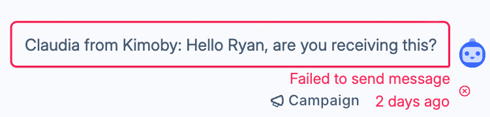
- If a mobile carrier flagged a message as spam, it would get rejected and create an error message in Kimoby. The customer has not received the message in this case :
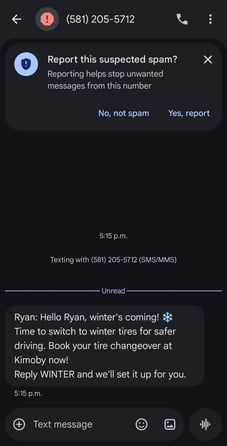
- If a device manufacturer, like Samsung, flagged the message as spam, it would show as delivered in Kimoby, with a blue checkmark next to the message:

However, on the customer’s end, the message would appear in their device’s spam inbox. The customer would need to mark the message as “Not spam”.
Best Practices to Avoid Spam Filters
- Avoid using certain terms. Using certain words or phrases in a campaign message can lead to a message being flagged as spam. Here is a list of terms to try and avoid:
Financial urgency:
“FREE”, “100% FREE”, “WIN”, “CASH”, “GUARANTEED”, “ACT NOW”, “LIMITED TIME ONLY”.
Over-promises:
“NO RISK”, “BEST PRICE”, “HURRY”, “ONCE-IN-A-LIFETIME”, “WINNER”
Shady transaction terms:
“CLICK HERE”, “BUY NOW”, “CALL NOW”, “ORDER TODAY”, “CREDIT CARD REQUIRED”
Excessive symbols:
“$$$”, “!!!”, “####”, “****”, or ALL CAPS messages.
- Don’t use too many emojis. To mobile carriers, excessive use of emojis is a telltale sign of a spam message. Here is an example of a message with too many emojis:
“Hi [Customer Name] 👋
Happy Holidays from [Dealership Name] 🎄❄️ To celebrate, we’re offering savings up to $5,000 💰on select vehicles 🚘
Book your holiday test drive here 👉📲 [link] Offers end December 10th 📅⏰
Warm wishes, and we hope to see you soon! 🙌✨
Thank you! 🎄😃" - Have customers add your Kimoby number to their contacts. Once your Kimoby phone number is a contact in the customer’s mobile device, the device will see that a known person is texting them and will usually stop filtering the text messages as spam.
- Include a call to action in your messages. When customers reply to your text messages, mobile carriers and device manufacturers see that they are engaging with you and are less likely to assume your messages are spam. Including a call to action in your message encourages customers to reply to you.
In our experience, messages are more likely to be filtered as spam when a customer has not replied to multiple text messages over the course of a few months or years.
- Avoid including links in your first few messages to a customer, if possible. Some carriers identify links in a text message to be a high risk of spam. Avoiding links for your first few campaigns can show mobile carriers and device manufacturers that your new Kimoby phone number is trustworthy and not a spam producer.
Another good tip for your campaigns is to use custom attributes, such as the “Customer Name” attribute to personalize the message. This not only shows the mobile carrier or device manufacturer that you know the customer personally, but also promotes customer engagement!
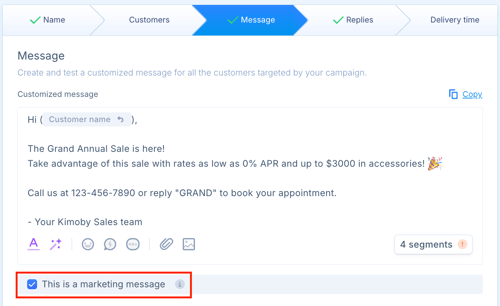
- When creating a campaign, correctly identify the message type. If your message is marketing-related, check the “This is a marketing message” box when creating your campaign message. This will ensure that customers who have opted out of marketing messages won’t receive it by mistake.