![kimoby-logo_g-black (4).webp]](https://help.kimoby.com/hs-fs/hubfs/kimoby-logo_g-black%20(4).webp?height=40&name=kimoby-logo_g-black%20(4).webp)
When customers can't reach your dealership, they get frustrated, which can impact your CSI scores. Kimoby Voice ensures every caller feels taken care of, even when your team can't get to the phone. It answers inbound calls automatically, collects the information you need, and gives you everything to follow up fast.
What is Kimoby Voice?
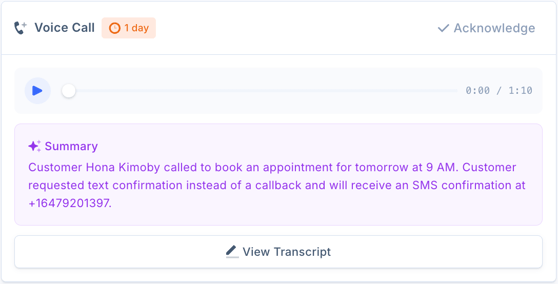
Instead of sending missed calls to voicemail, Kimoby Voice handles the conversation. It greets the customer, collects the relevant details of their request, and asks whether they'd prefer a callback or a text. A summary, transcript, and recording are automatically added to the customer's conversation in Kimoby, and if the caller sounds frustrated, your team is flagged so they can follow up with the right approach.
In addition, the conversation will automatically be assigned to the right person based on the data Kimoby has of your customer. For example, if the customer already has an open work order with advisor John Smith, the call will be added to the customer conversation and assigned to John Smith.
Why Kimoby Voice is a Great Tool
Every caller gets an answer, no matter how busy your team is.
When your team is with a customer or all lines are busy, Kimoby Voice picks up automatically. No more choosing between the person at the counter and the one on the phone, every caller gets a response, every time.
It works after hours.
Customers who call in the evening or on weekends still get answers and can leave messages that your team picks up the next morning without worry of missing out on potential business.
Customers hear back faster.
Instead of customers waiting for a callback that might not happen until the next day, Kimoby Voice collects what the customer needs in real time and routes it to the right person right away.
Calls can convert to text messages.
Kimoby Voice asks every caller how they'd prefer to be reached. If they choose text, it automatically sends them a message letting them know a follow-up is on the way, buying your team time to respond before frustration sets in on the customer’s end.
Kimoby Voice Best Practices
Best Practices During Setup
You can set up a separate Kimoby Voice for each department.
Each department (service, parts, sales, etc) can have its own Kimoby Voice configuration so calls are always routed to the right team. That way, a customer calling to purchase a new vehicle won't end up in the service department.
Let your on-boarder know how your phone system is structured.
The setup process is different depending on whether your advisors each have direct phone lines or one phone line with different extensions. Share that information with your Kimoby on-boarder so that the Kimoby Voice is configured correctly from the start.
Call your Kimoby Voice number to test it before going live.
The best way to know what your customers will experience is to go through it yourself. Call the number and describe to the AI something a customer might be looking for (for example, booking an appointment, reporting an issue with their vehicle, etc). This process only takes a few minutes and will help you familiarize yourself with the feature.
Tips for Using Kimoby Voice
Acknowledge AI calls so your team stays in sync.
When Kimoby Voice handles a call, it will generate a transcript and summary in the customer’s profile and in the Call Logs tab. Use the Acknowledge button to let others on your team know that the conversation is being taken care of. This prevents two people from following up on the same customer at the same time.
Reassign and leave a note when working from a shared inbox.
If your dealership uses a shared inbox for reception or dispatch, don't just leave the conversation sitting there. Reassign it to the right user and add a note with any relevant context so nothing falls through the cracks.
Tip
You can @ mention the user in the note as well so that they’ll get a notification for the note.
Check the Call Logs tab first thing in the morning.
Any calls that came in after hours will be waiting for you in the morning. Checking the Call Logs as a part of your morning routine means customers hear back quickly and no request gets missed.